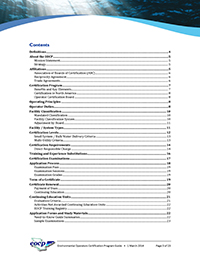
4 Standard ContentsTable of ContentsThe table of contents (often referred to as simply Contents) lists the headings and their page numbers. The headings are listed in the order they are found and exactly as worded. Together with the index, the table of contents is the primary means of finding information. It is always placed at the front. Print ManualsYour table of contents should list either two or three levels of headings. Two levels would be chapters and sections. Three levels would be chapters, sections, and sub-sections. While listing three levels gives you more detail, it can significantly lengthen the table of contents. Don’t let it get longer than a couple of pages. Some authors like to provide a single-level table of contents at the front, and a more detailed two-level table of contents at the beginning of each chapter. These are called chapter tables of contents. While it keeps the main table of contents simple, it does require the reader to look through two different tables of contents located in different places to find something. The table of contents in a modular manual does not list page numbers—it lists module numbers, since that’s how readers will locate the information (see Figure 4-2). In the right column where page numbers would normally be, list the current issue date of each module. Readers can then simply refer to the table of contents to see if they’ve got all of the modules, and if the modules they’ve got are current. This effectively eliminates the need for a revision register, but requires you to update and replace the table of contents when you update the manual.
Figure 4-2: Sample table of contents for a print manual Online ManualsThe table of contents in an online manual can be virtually the same as the table of contents in a print manual, or it can be set up very differently. The advantage of an online table of contents is that you simply click on what you want—you don’t need to turn pages. The table of contents in Figure 4-3 is placed in a separate frame, a scrollable window in which topics can be displayed. The table of contents expands when you click a chapter to reveal the sections. Some of the sections can be clicked and expanded to reveal sub-sections. Information topics appear in the right frame. In the following example, the table of contents remains visible at all times, which allows the user to browse easily from one section to the next.
Figure 4-3: Sample table of contents in the left frame and information topic in the right frame |